

How to Use Golf Tags: Step-by-Step Setup & Shot Tracking
Golf tags sound fancy, but they're actually pretty straightforward once you know what they do. Basically, you tap a golf tag to your phone, and it automatically records your shot data including GPS position and which club you used. No manual entry. No guessing. Just real-time tracking that helps you understand your game and keep tabs on your equipment.
If you're tired of losing clubs on the course or want solid data to improve your performance, Golf Club Watch Knowledge walks you through everything you need to know about using golf tags effectively.
In this article
- What Golf Tags Actually Do
- How to Set Up Your Golf Tags
- Using Golf Tags During Your Round
- How GPS Tracking Improves Your Data
- Tracking Performance Over Time
- Device Compatibility and Wearables
- Common Mistakes to Avoid
- Making Better Equipment Decisions with Tag Data
- Why Consistent Data Collection Matters
- Tips for Getting the Most Out of Your Tags
- Preventing Lost Clubs Through Tag Awareness
What Golf Tags Actually Do
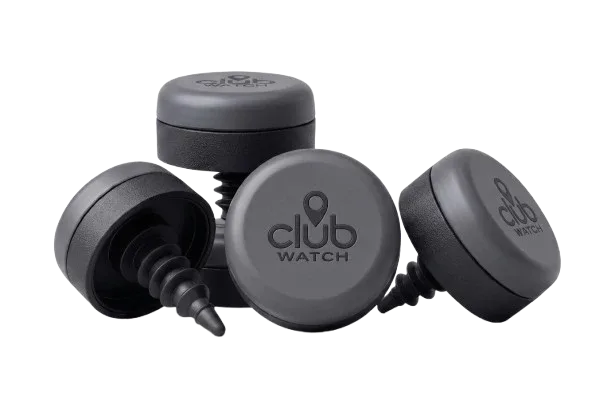
Think of a golf tag as a small identifier paired with each club in your bag. When you tap it to your phone during a round, the system knows exactly which club you just used and records the GPS coordinates of where that shot landed.
Each tag is uniquely paired with a specific club. So when you tap the tag attached to your 7-iron, the system automatically knows it's a 7-iron. No confusion. No manual labeling.
The real magic? You get accurate shot data without any fuss. GPS location, club identification, distance calculations—all captured in one tap.
How to Set Up Your Golf Tags
Setup happens on your mobile device and takes just a few minutes.
Step 1: Activate Each Tag
Start by activating your tags through the mobile app. Each tag needs to be registered and paired with a specific club in your bag. This is how the system knows your 7-iron is your 7-iron.
Step 2: Configure Your Setup
Assign each tag to its club during the initial setup configuration. You'll tell the system which tag belongs to which club. This one-time step ensures accuracy every time you tap.
Step 3: Test Before You Play
Do a quick test tap to make sure everything's communicating. Your phone should recognize the tag right away. If it doesn't, check your Bluetooth connection and make sure the app is up to date.
That's it. You're ready to start tracking.
Related: Best Golf Shot Tracking Apps 2026: Top 5 Ranked
Related: Best Golf Shot Tracking Devices 2026: Top 5 Ranked
Related: Best Golf Shot Tracking Apps & Devices 2026
Using Golf Tags During Your Round
On the course, the process is dead simple: hit your shot, then tap the tag on your club to your phone.
The tag sends the GPS position of that exact moment, automatically identifies which club you used (because of the pairing you set up), and logs the data. Do this for every shot, and by the end of your round you've got a complete record of your game.
No app notifications interrupting your swing. No complicated buttons to push. Just a quick tap when you're ready to record.
The system generates accurate shot data that you review later. Some golfers tap after every shot. Others tap key shots. You decide what level of detail matters for your game.
How GPS Tracking Improves Your Data

When you tap a golf tag, it records the exact GPS location of each shot. That precision matters because it turns vague distances into measurable facts.
Instead of guessing "I hit it pretty far with my driver," you see the actual distance. Over time, this data helps you identify patterns in your game.
You start noticing which clubs perform best in different conditions. You see how far you really hit each club, not how far you think you hit them. That's the kind of honest feedback that actually improves your performance.
Tracking Performance Over Time
The whole point of using golf tags is that recorded shot data enables objective tracking. No guessing. No inflating your distances.
Review your shot history in the app. Look for patterns. Maybe you consistently miss short with your 6-iron. Maybe your wedge distances are more consistent than you thought. Maybe one club is holding you back.
This kind of insight is gold for making equipment decisions. Should you replace that 5-iron? The data tells you. Should you spend time at the range with your driver? Your shot pattern might say yes.
Golf Club Watch Knowledge customers use this data to eliminate guesswork and focus on what actually matters.
Device Compatibility and Wearables
Your golf tags work with wearable devices and bag-mounted sensors that detect tag proximity. Most modern smartphones have Bluetooth built in, so compatibility is rarely an issue.
If you're using a wristband or other wearable, make sure it's synced with your phone and the app is installed. The system talks to your phone first, which then communicates with the tags.
Check your device's Bluetooth settings if you run into connection issues. Sometimes a quick toggle off and on fixes everything.
Common Mistakes to Avoid
Skipping the setup step. Don't just attach tags and hope the system figures it out. Proper pairing during setup is what makes the whole system work.
Forgetting to tap. The system only records what you tell it to record. If you hit a shot and don't tap, there's no data. Build it into your routine.
Poor Bluetooth connection. Keep your phone close during your round. If you're 50 feet away from your bag, the connection might drop. Stay within reasonable range.
Not reviewing your data. Collecting shots is only half the battle. Take time to actually look at what the data is telling you. That's where improvement happens.
When you're ready to get serious about your equipment protection and shot tracking, Golf Club Watch Knowledge provides everything you need to keep your clubs safe and your game data solid.
Making Better Equipment Decisions with Tag Data
Once you've collected enough shot data, you can make informed decisions about your bag.
Do you really need that 4-hybrid, or is your 5-wood outperforming it? The data shows you. Is your putter distance control off? The numbers prove it.
This is especially useful if you're thinking about adding new clubs or replacing older ones. You'll know exactly which clubs in your current set are actually worth keeping and which ones are dead weight.
Over time, your collection of shot data becomes your personal equipment playbook. That's worth more than any magazine review or friend's recommendation.
Why Consistent Data Collection Matters
The longer you use golf tags, the more valuable your dataset becomes. One round of data is interesting. A season of data is powerful.
You start seeing seasonal patterns. You notice how your distances change with temperature and humidity. You track improvement over months and years.
Consistency is key. Tap every shot, or at least every important shot. The more complete your data, the clearer the picture of your game.
Tips for Getting the Most Out of Your Tags
Tap right after impact. The sooner you record, the fresher the GPS location. Plus, it becomes habit.
Keep your phone charged. A dead phone means no data collection. Bring a portable charger on longer rounds.
Review weekly, not just at season's end. Small patterns show up faster when you're looking at recent rounds.
Note course conditions. Wet fairways, firm greens, wind direction—jot these down if your app allows. Context helps explain your data.
Don't obsess over single shots. Trends matter more than one great drive or one bad approach. Look for the big picture.
Preventing Lost Clubs Through Tag Awareness
Using golf tags consistently also trains you to stay aware of your equipment. You're checking your phone after each shot. You're thinking about your clubs constantly.
That heightened awareness alone reduces the chance of leaving a club behind. Plus, if you do somehow leave one on a hole, you'll notice the missing tag in your data pretty quickly.
Many golfers pair their shot-tracking tags with equipment protection systems to catch lost clubs before they disappear for good.
What if my phone loses Bluetooth connection mid-round?
The data you've already recorded is safe. When you reconnect, the system will sync any pending shots. Just make sure to stay within Bluetooth range (usually 30 feet or so) and reconnect before you leave the course.
Do I have to tap after every single shot?
No. Tap the shots that matter most to you. Some players tap drives and approach shots only. Others tap everything. The system is flexible. Just know that less data means less insight into your game.
Can I use golf tags on different courses or practice ranges?
Yes. Tags work anywhere you have Bluetooth connection and GPS signal. Practice ranges, different courses, even par-3 executive courses. The GPS location logging works everywhere.
How accurate is the GPS data from golf tags?
GPS accuracy depends on your phone's chipset and atmospheric conditions. Most modern phones give you within a few yards. That's accurate enough for shot tracking and spotting patterns, even if it's not laser-rangefinder precise.