

Golf Club Monitoring During Tournament Rounds: Live Tracking Guide
Golf club monitoring during tournament rounds sounds fancy, but it's really just keeping tabs on your equipment in real-time so you never lose a club when it matters most. Tournament play is stressful enough without wondering if your putter is still in your bag.
The good news? Modern technology makes this easier than ever. Grip-mounted sensors paired with mobile apps let you track every club automatically throughout your entire round, whether you're playing solo or competing in a big event. No manual entry. No guesswork. Just peace of mind.
Let's walk through how to set up club monitoring for your next tournament and why it actually changes the game.
In this article
- How Real-Time Club Tracking Works During Tournaments
- Setting Up Monitoring Before Your Tournament
- Monitoring During the Round
- Multi-Group Tournament Tracking
- Combining Club Monitoring With Live Scoring
- Why Tournament Club Monitoring Matters
- Best Practices for Tournament Monitoring
- Troubleshooting Common Monitoring Issues
- Scaling Monitoring Across Larger Tournaments
- Privacy and Data Security in Tournament Monitoring
- Moving Forward With Tournament Club Monitoring
How Real-Time Club Tracking Works During Tournaments
Tournament club monitoring relies on lightweight sensors attached to your club grips. These sensors communicate with a free mobile app on your phone via Bluetooth, creating a live connection between your equipment and you.
Here's what happens: every time you take a shot, the sensor registers club contact and logs it instantly. The app records which club you used, the sequence of your shots, and flags any club that hasn't been used recently or that leaves your immediate vicinity.
If a club goes missing mid-round, you get an alert right away. No more finishing nine holes only to realize your wedge is back at the turn. You can backtrack immediately and find it before moving forward.
This is different from traditional scorekeeping. Scoring apps record just your strokes and scores. Club monitoring tracks your actual equipment. Think of it as a GPS for your clubs themselves.
Setting Up Monitoring Before Your Tournament
Start by installing sensors on all the clubs you plan to use. Most golfers protect their most-lost clubs first: putter, sand wedge, and gap wedge.
If you're looking for a complete setup, Golf Club Watch Knowledge offers options ranging from starter packs to full 13-club coverage so you can choose what fits your needs.
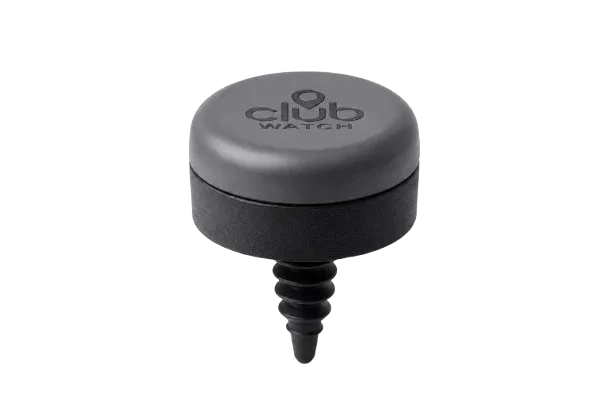
Once sensors are attached, pair them with the mobile app. This takes about two minutes per club. The app will guide you through it step-by-step.
Test the connection before tournament day. Walk around your home or practice facility and confirm that the app detects each club. Make sure Bluetooth is enabled on your phone and stays on throughout your round. Battery drain is minimal, but check your phone battery before heading to the course.
Arrive early to the tournament and do a final equipment check. Verify all your clubs appear in the app and that sensors are secure on each grip. Loose sensors can affect reliability.
Monitoring During the Round
Keep your phone in your pocket or bag where it can maintain Bluetooth range. Range is typically 30-40 feet, which covers your bag and immediate playing area.
Check the app between holes if you want. It shows you which clubs you've used, how many shots you've taken with each, and instantly alerts you if a club is out of range or missing.
Most golfers don't obsess over the app during play. The real value is that you're protected. If something goes wrong, the alert pulls you back to reality immediately.
Some tournament players use the shot-by-shot data afterward to review performance. This helps you spot patterns: maybe you're reaching for one club too often, or you're not using certain clubs effectively. It's great intel for practice.
Multi-Group Tournament Tracking

If you're organizing a tournament or playing in a club event, you can use monitoring to track all players' clubs simultaneously. Tournament organizers can consolidate live data from multiple groups on different parts of the course.
This means tournament directors get a real-time view of which groups are on pace, which clubs are being used most across the field, and whether any equipment goes missing across the entire tournament. It's one less headache to manage manually.
For players, it's completely transparent. Your club data feeds into the tournament system without interfering with your round. No extra effort on your end.
Combining Club Monitoring With Live Scoring
Club tracking and live scorekeeping work hand-in-hand. Most tournament apps now consolidate scoring, group tracking, and equipment management into one platform.
Your score gets recorded (manually or through a scorecard app), and simultaneously your club data uploads to the same system. Tournament organizers see your strokes, your score, and confirmation that all your equipment stayed with you.
This unified approach removes friction. You're not bouncing between multiple apps or worrying that scoring is separate from equipment accountability. Everything syncs in one place.
Why Tournament Club Monitoring Matters
Tournaments bring stress. You're focused on your swing, your score, the course conditions, and your competitors. Your equipment is the last thing you want to worry about.
Losing a club mid-tournament derails your round. You either play without it, which throws off your strategy, or you waste time searching. Both scenarios hurt your score and your confidence.
Automated club monitoring removes that variable entirely. You know your clubs are safe because the system tells you. That peace of mind lets you focus purely on golf.
Additionally, when tournament organizers track equipment in real-time, it creates accountability and reduces disputes. If a club goes missing, there's a data trail. If equipment damage occurs, you have documentation.
Best Practices for Tournament Monitoring

Charge your phone the night before and bring a portable charger if the tournament runs long or spans multiple days.
Use a golf bag with designated pockets so clubs stay organized and close together. This keeps Bluetooth range stable and makes visual checks easier.
Label your clubs clearly. Even with sensors, a visual identifier (your name or initials on the grip) helps if another player accidentally grabs your club.
Review the app data after each round. You'll start to see your patterns: which clubs you rely on, which ones you neglect, and where your game needs work.
If you're not sure whether your current setup will work for tournament play, Golf Club Watch Knowledge can help you choose the right coverage for your bag and tournament style.
Troubleshooting Common Monitoring Issues
If the app stops detecting a club mid-round, first check that Bluetooth is still enabled on your phone. Sometimes it disconnects unexpectedly.
Move closer to the club. If you're too far from your bag, the signal weakens. Walk back toward your equipment to re-establish the connection.
If a sensor repeatedly disconnects, it might need re-pairing. Do this at home or between rounds so it doesn't disrupt tournament play.
Extreme heat or moisture can affect sensor performance, though modern sensors are built to handle typical golf conditions. Keep your phone and bag out of direct sunlight when possible.
Battery life on sensors varies, but most last weeks or months depending on usage. Charge before tournaments if that's an option, or replace sensors if they stop responding.
Scaling Monitoring Across Larger Tournaments
Club-level data becomes really valuable when you're running a large event. Tournament software platforms now integrate sensor data with scoring and leaderboards.
Instead of manual scoring sheets and separate equipment logs, everything flows into a cloud-based system. Results update in real-time. Spectators can follow live leaderboards. Organizers manage administrative tasks from one dashboard.
This simplicity is key to adoption. The more straightforward the system, the more players engage with it. Nobody wants to fiddle with multiple apps or remember complicated procedures on tournament day.
If you're managing a tournament and looking to implement automated club monitoring across all participants, make sure your chosen platform is easy to understand and requires minimal training. The technology should fade into the background and let golfers play golf.
Privacy and Data Security in Tournament Monitoring
Your club data is yours. Tournament organizers should only access the information necessary to run the event: that your clubs stayed with you and your round completed successfully.
Reputable monitoring systems use encrypted cloud storage and don't share individual player data without permission. Read the privacy terms of any platform your tournament uses.
You control whether your data syncs to the tournament system. Most platforms let you opt in or out, though tournament participation may require it.
If you're uncomfortable with data sharing, talk to the tournament director before the event. Ask what data is collected, how it's stored, and who has access. Transparency matters.
Moving Forward With Tournament Club Monitoring
Tournament golf demands focus and confidence. Losing equipment shouldn't be part of that equation.
Whether you're playing in a local club event or a larger competition, adding club monitoring takes one stress off your plate. You show up, you golf, and your equipment stays protected automatically. The system handles the logistics.
Start with a small setup if you're new to this. Protect your most-lost clubs first. Learn how the app works. Then expand coverage as you get comfortable. There's no rush to monitor every single club immediately.
The more you use club monitoring, the more you'll appreciate it. Tournament day clarity is worth it.
What's the difference between club monitoring and scoring apps?
Scoring apps track your strokes and calculate your score. Club monitoring tracks your physical equipment and alerts you if something goes missing. Some apps do both, but they're fundamentally different functions. Scoring answers "how am I playing?" Club monitoring answers "where are my clubs?"
Do I need cell service for club monitoring to work during a tournament?
No. Grip sensors communicate with your phone via Bluetooth, which works offline. The live tracking happens locally between your phone and your clubs. If you want to upload data to a tournament platform afterward, you'll need internet at that point, but not during the round.
Can tournament organizers force me to use club monitoring?
Not typically. Some tournaments offer it as an optional feature, others require it as part of their event infrastructure. Ask the tournament director before you enter whether monitoring is required. If it is, that information should be stated upfront.
How many clubs can I monitor at once?
Depends on your setup. You can start with as few as two clubs (like a putter and your most-used wedge) and scale up to your entire 14-club bag. Choose whatever coverage matches your worry level and your budget.